Mastering Secret Management on Kubernetes with Vault Secrets Operator
Overview
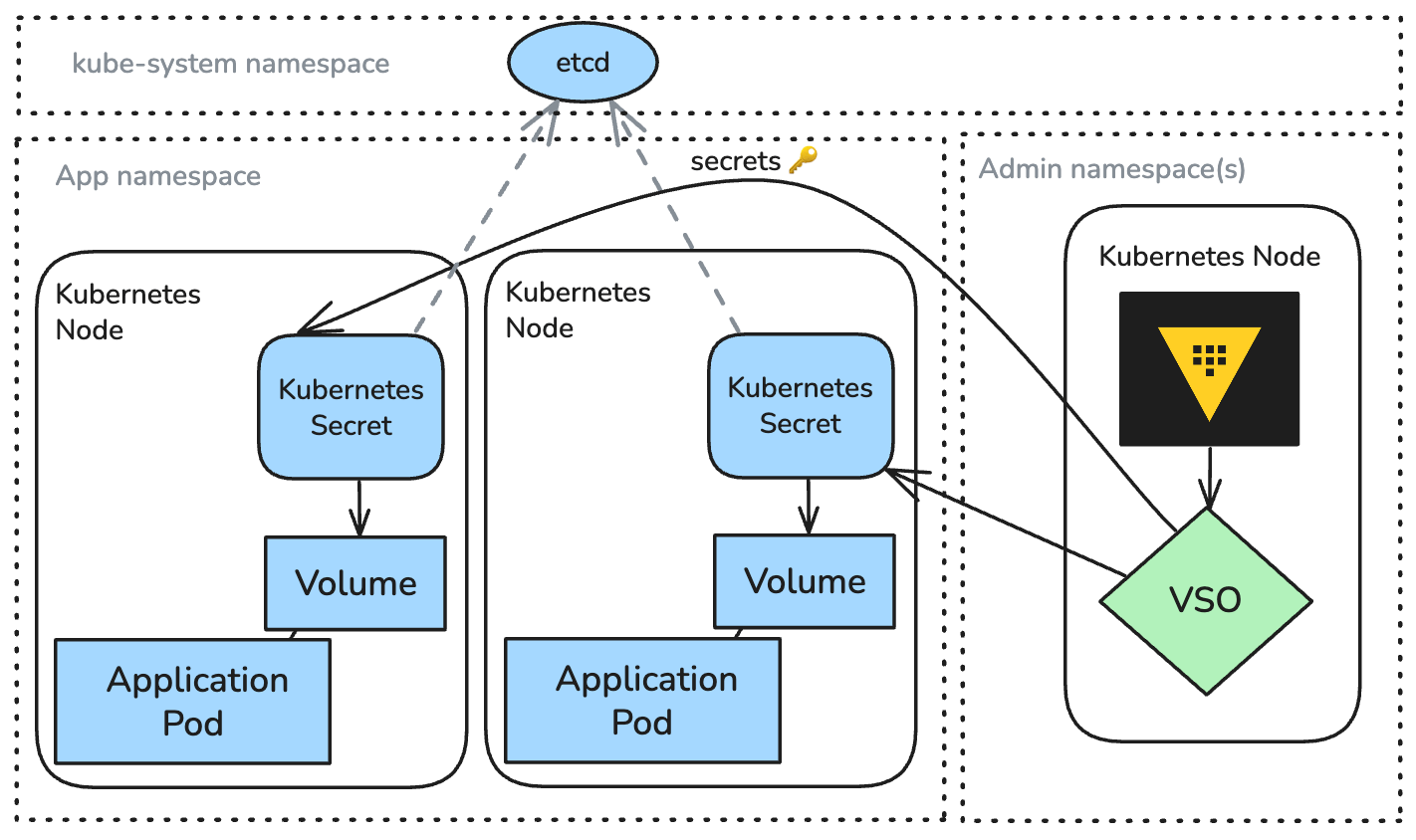
Platform teams managing Kubernetes often discover a massive security gap: reliably managing secret lifecycles—generation, injection, rotation, and revocation—without slowing development. While native Kubernetes Secrets exist, they lack enterprise governance, especially across hybrid cloud environments. This is where Vault Secrets Operator (VSO) enters as the modern, recommended standard. VSO centralizes secret management with Vault, offering Kubernetes-native automation without changing how pods consume secrets. This guide demystifies VSO, compares it to older patterns (like the Vault agent sidecar injector or Secrets Store CSI driver), and provides step-by-step instructions to get started.
Prerequisites
- A running Kubernetes cluster (vanilla, Amazon EKS, Google GKE, or Red Hat OpenShift) with administrative privileges.
- HashiCorp Vault already deployed and accessible from the cluster (on-premises or Vault Cloud).
- kubectl (or oc for OpenShift) configured to interact with the cluster.
- Helm v3+ installed locally.
- Basic familiarity with Vault policies, authentication methods, and secrets engines.
- Vault CLI (optional but helpful for testing).
Step-by-Step Instructions
1. Install the Vault Secrets Operator
VSO is deployed via a Helm chart. Add the HashiCorp Helm repository and install:
helm repo add hashicorp https://helm.releases.hashicorp.com
helm repo update
helm install vault-secrets-operator hashicorp/vault-secrets-operator --namespace=vault-secrets-operator --create-namespace
Verify the operator pod is running: kubectl get pods -n vault-secrets-operator.
2. Configure Vault Connection
Create a VaultConnection custom resource that tells VSO how to reach Vault:
cat <<EOF | kubectl apply -f -
apiVersion: secrets.hashicorp.com/v1beta1
kind: VaultConnection
metadata:
  name: default
  namespace: vault-secrets-operator
spec:
  address: https://vault.example.com:8200
  skipTLSVerify: false
  tlsSecretRef: vault-tls # optional, if using custom CA
EOF
Replace address with your Vault server URL. If using TLS, ensure trust is configured.
3. Set Up Authentication
VSO authenticates to Vault using the Kubernetes auth method. First, ensure the Vault Kubernetes auth backend is enabled and configured (outside this guide). Then create a VaultAuth resource:
cat <<EOF | kubectl apply -f -
apiVersion: secrets.hashicorp.com/v1beta1
kind: VaultAuth
metadata:
  name: static-auth
  namespace: default
spec:
  namespace: admin # optional Vault namespace
  vaultConnectionRef: default
  method: kubernetes
  mount: kubernetes
  kubernetes:
    role: my-role
    serviceAccount: my-sa
    tokenReviewerServiceAccount: my-sa
EOF
Create the corresponding Vault role and service account in the default namespace.
4. Define a Secret Using VaultSecret
Fetch a static secret from Vault and synchronize it to a Kubernetes Secret:
cat <<EOF | kubectl apply -f -
apiVersion: secrets.hashicorp.com/v1beta1
kind: VaultSecret
metadata:
  name: db-creds
  namespace: default
spec:
  vaultAuthRef: static-auth
  namespace: admin
  mount: secret
  path: database/creds/app
  type: Opaque # or kubernetes.io/basic-auth, etc.
  destination:
    name: db-creds-secret
    create: true
    overwrite: false
EOF
After creation, VSO populates the db-creds-secret Kubernetes Secret. Pods can reference it normally.
5. Use Dynamic Secrets
For dynamic secrets (e.g., database credentials that expire), use VaultDynamicSecret:
apiVersion: secrets.hashicorp.com/v1beta1
kind: VaultDynamicSecret
metadata:
  name: app-db-creds
  namespace: default
spec:
  vaultAuthRef: static-auth
  namespace: admin
  mount: database
  path: postgres/creds/readonly
  destination:
    name: app-db-creds-secret
    create: true
  revocationDuration: 5m
  rollout: pods
  allowedKubernetesNamespaces: []
EOF
Setting rollout: pods triggers a rolling update of pods when the secret is rotated.
6. (Optional) Integrate with Secrets Store CSI Driver for Live Rotation
VSO also supports the Vault Secrets Operator Protected Secrets pattern, which uses a built-in CSI driver companion. To use it, install the CSI driver and create a SecretProviderClass pointing to the VSO-protected secret. This enables automatic mounting of secrets with zero pod restart on rotation.
Common Mistakes
- Misconfigured Vault authentication: Ensure the Kubernetes auth role in Vault matches the
VaultAuthresource’sroleand that the service account has the necessary annotations. - Ignoring Vault namespaces: If using Vault Enterprise namespaces, always include
spec.namespacein bothVaultConnectionandVaultAuth/VaultSecret. - Secret path typos: Double-check the Vault mount and path. Use the Vault CLI:
vault kv get secret/my-path. - Permissions for operator: The VSO service account needs RBAC permissions to create/update secrets. The Helm chart sets them, but custom configurations may miss
cluster-adminbindings. - Overwriting existing secrets: Set
spec.destination.overwrite: trueonly if you want VSO to overwrite changes made manually; otherwise, avoid it to prevent drift.
Summary
Vault Secrets Operator eliminates the complexity of managing secrets across Kubernetes by providing a declarative, Kubernetes-native approach to lifecycle automation. It supersedes older patterns like the sidecar injector by reducing resource overhead and enabling features like dynamic secret rotation with pod rollout. By following the steps above, you can securely connect your cluster to Vault, define static or dynamic secrets, and let VSO handle the rest—allowing your team to focus on delivering features.
Related Articles
- Frontier AI Sparks Race in Cyber Defense: SentinelOne Reveals How Machine-Speed Autonomy Stops Zero-Day Threats
- 10 Critical Facts About the Canvas Cyberattack That Disrupted Final Exams
- Defending Against AI-Enhanced Cyber Attacks: A Practical Guide to Mitigation and Readiness
- Unpatched 2020 Windows Bug Exploited: MiniPlasma Code Goes Public
- Cyber Police Unmask Teenage Infostealer Suspect Linked to 28,000 Compromised Accounts
- Critical Vulnerability in Google Gemini CLI Could Allow Remote Code Execution (CVSS 10)
- Supply Chain Attack on Popular Machine Learning Package Exposed User Credentials
- Building a Zero-Trust Network Simulation with Micro-Segmentation and Adaptive Policies